SMS Messaging Policy
Sipp Intel Alerts · Hello Sipp LLC · Last updated July 5, 2026
1. Who we are
This SMS program, Sipp Intel Alerts, is operated by Hello Sipp LLC(“Hello Sipp,” “we,” “us”) of Chicago, Illinois. Hello Sipp provides a business-to-business wine market intelligence platform, Sipp Intelligence, for the wine trade — suppliers, distributors, and importers. For any questions about this program or your messages, contact us at jake@hellosipp.app.
2. The Sipp Intel Alerts program
Sipp Intel Alerts sends account alert notificationsto our business clients about activity in the wine markets they track. These are transactional, account-based notifications tied to a client’s own portfolio and competitors — they are not marketing or promotional messages to the general public. Subscribers who opt in may receive text alerts such as:
- New placements — when a tracked wine appears at a new venue
- Lost placements — when a tracked wine is removed from a venue
- Price changes — when a tracked wine’s price changes significantly
- Competitor activity — when competitors gain or lose placements
- Opportunities — when venues carrying competing wines do not carry the subscriber’s wine
Each business subscriber chooses which of these alert types to receive, and on which channel, in their dashboard Notification Preferences. Message frequency variesbased on market activity in the subscriber’s account; alerts are event-driven and a typical subscriber receives a small number of messages per week.
3. How subscribers opt in
SMS messaging is strictly opt-in and is only available to authenticated Sipp Intelligence clients. Consent to receive text messages is never a condition of purchase or of using the platform. There is no way to be enrolled without taking these deliberate steps inside the dashboard, under Settings → Notification Preferences:
- The client enters and saves their own mobile phone number (including country code).
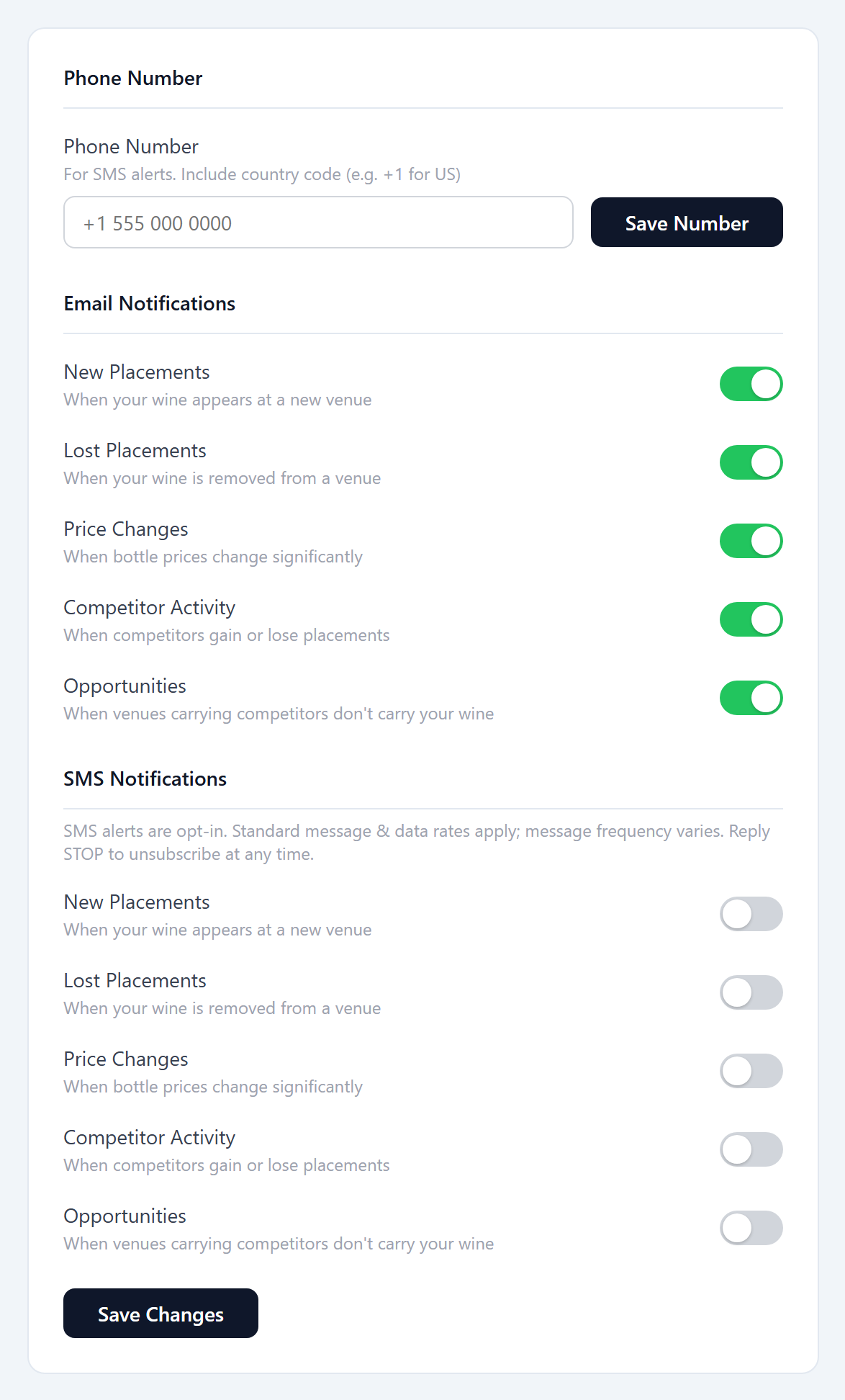
- The client turns on the specific SMS alert toggles they want. Every SMS toggle is OFF by default — the client must explicitly enable each one and save.
The screenshot below shows this opt-in screen. The phone-number field sits above the SMS section, and each SMS alert toggle is shown in its default OFF state; the screen also states that standard message and data rates apply.
4. Opt-out and help
Reply STOP to unsubscribe. Reply HELP for help. Message and data rates may apply. Message frequency varies.
You can cancel the SMS service at any time by replying STOP to any message. After you send STOP, we will send a confirmation and then stop sending SMS messages. Subscribers can also turn off SMS notifications at any time from the Notification Preferences in their account settings. For help, reply HELP to any message or email jake@hellosipp.app.
5. Privacy
We do not sell or share subscribers’ mobile phone numbers or SMS opt-in data with third parties for their marketing purposes. Mobile opt-in data and consent information are never shared with third parties. Phone numbers collected for SMS alerts are used solely to deliver the notifications described above. See our full Privacy Policy and Terms & Conditions.